> ## Documentation Index
> Fetch the complete documentation index at: https://docs.axuremart.com/llms.txt
> Use this file to discover all available pages before exploring further.
# 安装与更新
> 在 VSCode 终端中安装和更新 Claude Code
## 安装 Claude
1. 打开 VSCode
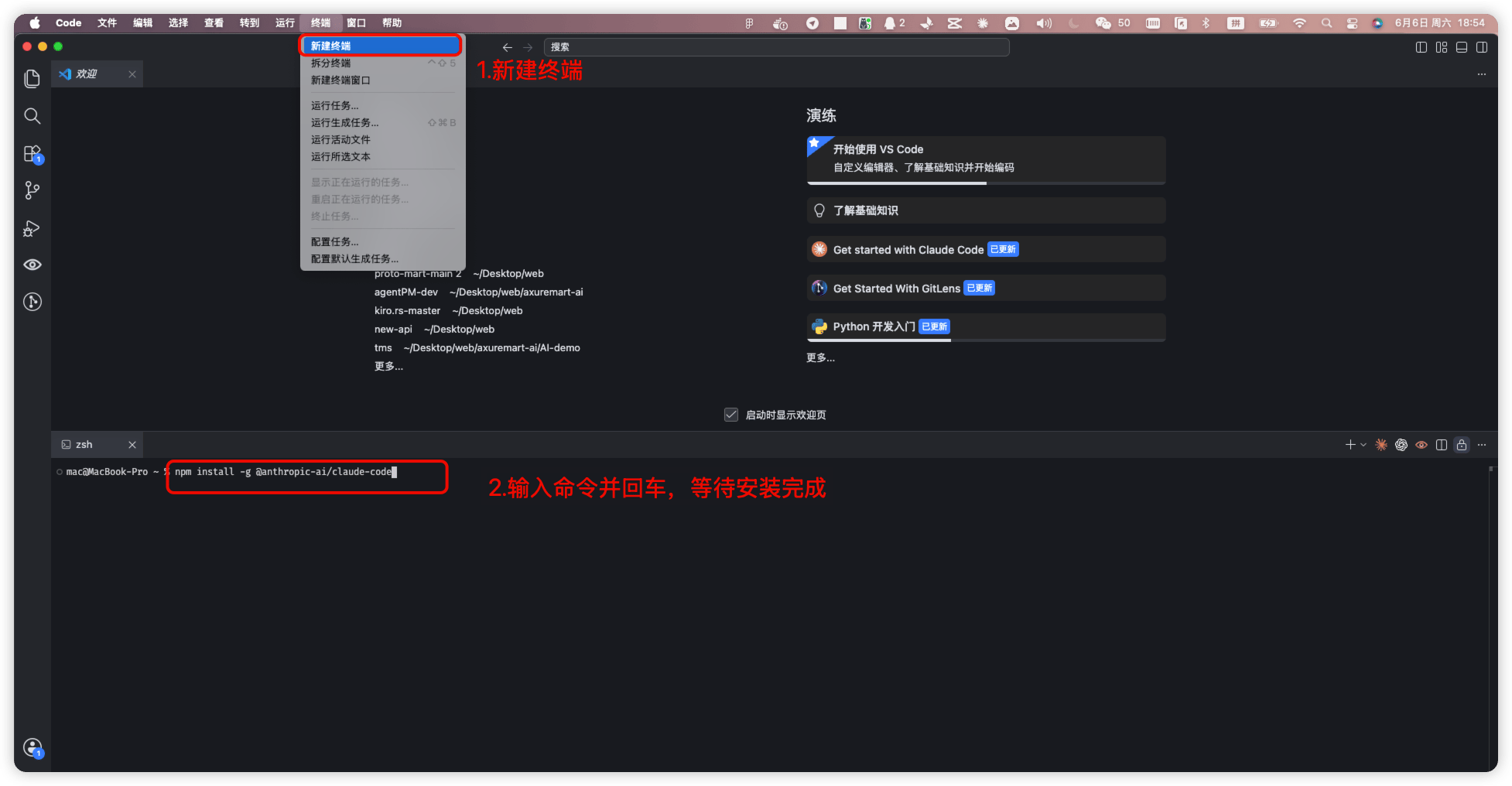
2. 点击顶部菜单「终端」→「新建终端」
3. 终端窗口会在 VSCode 底部打开
4. 输入以下命令
 ```bash theme={null}
npm install -g @anthropic-ai/claude-code
```
5. 苹果电脑如果遇到权限错误(提示 `errno: -13`),请使用以下命令:
```bash theme={null}
sudo npm install -g @anthropic-ai/claude-code
```
## 更新 Claude
1. 打开终端:VSCode 顶部菜单「终端」→「新建终端」
2. 终端输入以下命令
| 操作 | 命令 |
| - | - |
| 查看当前版本 | `claude --version` |
| 更新到最新版 | `claude install` |
| 通过 npm 更新到最新版本 | `npm update -g @anthropic-ai/claude-code` |
| 安装指定版本 | `npm install -g @anthropic-ai/claude-code@版本号` |
This documentation is built and hosted on [Mintlify](https://mintlify.com), a developer documentation platform.
```bash theme={null}
npm install -g @anthropic-ai/claude-code
```
5. 苹果电脑如果遇到权限错误(提示 `errno: -13`),请使用以下命令:
```bash theme={null}
sudo npm install -g @anthropic-ai/claude-code
```
## 更新 Claude
1. 打开终端:VSCode 顶部菜单「终端」→「新建终端」
2. 终端输入以下命令
| 操作 | 命令 |
| - | - |
| 查看当前版本 | `claude --version` |
| 更新到最新版 | `claude install` |
| 通过 npm 更新到最新版本 | `npm update -g @anthropic-ai/claude-code` |
| 安装指定版本 | `npm install -g @anthropic-ai/claude-code@版本号` |
This documentation is built and hosted on [Mintlify](https://mintlify.com), a developer documentation platform.